
Linear Algebra Introduction
The linear algebra part of ojAlgo is one of its main attractions as well as an essential component to the other parts. It’s not difficult to use at all, but to fully exploit its capabilities there are a few things you need to know.
The Very Basics
First let’s have a look at the very foundation of ojAlgo and its various array, vector and matrix classes. It all starts with the org.ojalgo.structure package and in particular the org.ojalgo.structure.Structure1D interface. This interface essentially declares one method – count() – returning the total number of elements/items in a data structure. It’s equivalent to the size() method of java.util.Collection but returns long rather than int. Some data structures in ojAlgo actually support containing that many elements/items.
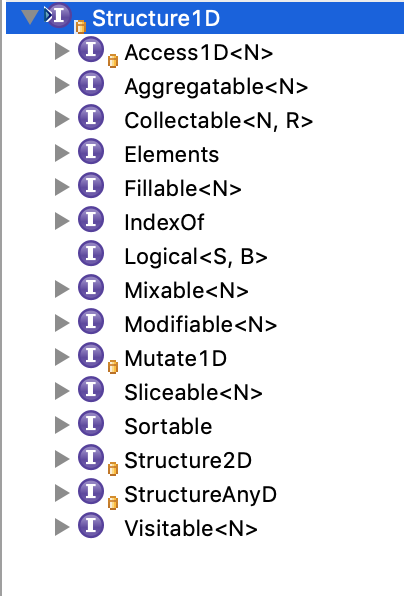
In your IDE – assuming you have a project setup with ojAlgo on the classpath – open a type hierarchy with Structure1D at the root. That type hierarchy is fairly deep/complex and encompasses a very large subset of everything in ojAlgo. Understanding at least the basics of how this hierarchy is constructed is necessary for all ojAlgo users – please spend some time exploring it!
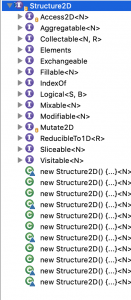
Studying that hierarchy you should notice 3 things:
- To complement Structure1D there are interfaces Structure2D and StructureAnyD, both of which extend Structure1D. Extending each of those three Structure- interfaces you’ll find the Access1D, Access2D and AccessAnyD interfaces (and many others). Access2D in turn extends Structure2D AND Access1D, similarly AccessAnyD extends StructureAnyD AND Access1D. This pattern is one of the core design decisions of ojAlgo. Anything “2D” or “AnyD” is also/simultaneously “1D” – there’s always a 1D variant of the API. How the 1D and 2D/AnyD API variants correlate is strictly specified.
- A large portion of the classes/interfaces in ojAlgo use generic type parameters to specify what they contain/handle, and practicly always the generic type declaration is:
<N extends Number>. ojAlgo is all about numbers and maths. - The Access1D, Access2D and AccessAnyD interfaces declare methods to get/extract/access one specific elements of a data structure. They each have a get(…) method returning a generic “N” (a Number subclass) as well as a doubleValue(…) method returning primitive double. Whatever Number subclass you’re working with you always have direct access to primitive double representations. That can be very handy; particularly when the internal data type actually is primitive double, and that’s by far the most commonly used type for maths. This parallel type pattern is another of ojAlgo’s core design decisions. To see another example of this, find the org.ojalgo.function.BasicFunction interface and open another type hierarchy. Notice that each of the BasicFunction subtypes have 2 invoke-methods – 1 using primitive double and 1 using a generic “N”.
The ojAlgo data structures are not general purpose “collections”. They’re typically fixed size and shape, contain numbers only, and primitive double gets special treatment.
Arrays or Matrices?
Assuming you need a general purpose array, vector or matrix implementation of some sort there are two main alternatives:
- Array1D, Array2D or ArrayAnyD from the org.ojalgo.array package
- Something from the org.ojalgo.matrix package or its sub packages
The classes in the org.ojalgo.array package have some advantage over the various matrix implementations:
- They can be any-dimensional (AnyD) – matrices are 2D.
- They support huge data structures. You really can make use of those long element indices.
- They support a larger set of Number subclasses (for instance BigDecimal or primitive float).
- They can have their storage off-heap or mapped to files
The key thing not available in the org.ojalgo.array package is “Linear Algebra”.
Matrices and Linear Algebra
The top level org.ojalgo.matrix package contain 4 matrix implementations – PrimitiveMatrix, ComplexMatrix, RationalMatrix and even QuaternionMatrix – as well as a few supporting classes. This is what most new users find when they’re looking for “ojAlgo’s matrix class”, but there are actually two matrix implementation layers in ojAlgo. In addition to those 4 implementations there is the MatrixStore/PhysicalStore family of interfaces and classes in the org.ojalgo.matrix.store package.
The 4 *Matrix classes are higher/application/logic level implementations with a fixed and limited feature set, while MatrixStore/PhysicalStore are lower/algorithm/implementation level interfaces offering greater flexibility and control. Initially all the lower level stuff was just implementation details preferably hidden to users. This has changed. The lower level stuff is since long open and available to use for anyone. It is also where most of the development has been lately.
The higher level implementations are immutable. This can be very practical, but is an unusual feature for mathematical matrix classes, and most likely not what you expected. One of the things new users tend to get wrong is how to instantiate, and fully populate, an immutable matrix.
Each of the two implementation layers support three element types: double, RationalNumber and ComplexNumber. (In addition there is support for Quaternion matrices, but to be honest we don’t know what that would be useful for.) Most people will just use the double implementations, but some need ComplexNumber. If the matrices are not too large and you need that extra precision you can use RationalNumber.
The two layers are to some extent interoperable, but most users should choose either or. Have a look at both PrimitiveMatrix and PrimitiveDenseStore (assuming you need primitive double elements) and try to get some idea about the differences before you write too much code.
Example Code
GettingStarted.javaimport org.ojalgo.OjAlgoUtils;
import org.ojalgo.RecoverableCondition;
import org.ojalgo.matrix.MatrixR064;
import org.ojalgo.matrix.decomposition.QR;
import org.ojalgo.matrix.store.ElementsSupplier;
import org.ojalgo.matrix.store.MatrixStore;
import org.ojalgo.matrix.store.PhysicalStore;
import org.ojalgo.matrix.store.R064Store;
import org.ojalgo.matrix.store.RawStore;
import org.ojalgo.matrix.task.InverterTask;
import org.ojalgo.matrix.task.SolverTask;
import org.ojalgo.netio.BasicLogger;
import org.ojalgo.random.Weibull;
/**
* Getting Started with ojAlgo
*
* @see https://www.ojalgo.org/2019/03/linear-algebra-introduction/
*/
public class GettingStarted {
public static void main(final String[] args) {
BasicLogger.debug();
BasicLogger.debug(GettingStarted.class);
BasicLogger.debug(OjAlgoUtils.getTitle());
BasicLogger.debug(OjAlgoUtils.getDate());
BasicLogger.debug();
MatrixR064.Factory matrixFactory = MatrixR064.FACTORY;
PhysicalStore.Factory<Double, R064Store> storeFactory = R064Store.FACTORY;
// PrimitiveMatrix.Factory and PrimitiveDenseStore.Factory are very similar.
// Every factory in ojAlgo that makes 2D-structures
// extends/implements the same interface.
MatrixR064 matrixA = matrixFactory.makeEye(5, 5);
// Internally this creates an "eye-structure" - not a large array.
R064Store storeA = storeFactory.makeEye(5, 5);
// A PrimitiveDenseStore is always a "full array". No smart data
// structures here.
MatrixR064 matrixB = matrixFactory.makeFilled(5, 3, new Weibull(5.0, 2.0));
R064Store storeB = storeFactory.makeFilled(5, 3, new Weibull(5.0, 2.0));
// When you create a matrix with random elements you can specify
// their distribution.
/* Matrix multiplication */
MatrixR064 matrixC = matrixA.multiply(matrixB);
// Multiplying two PrimitiveMatrix:s is trivial. There are no
// alternatives, and the returned product is a PrimitiveMatrix
// (same as the inputs).
// Doing the same thing using PrimitiveDenseStore (MatrixStore) you
// have options...
BasicLogger.debug("Different ways to do matrix multiplication with " + "MatrixStore:s");
BasicLogger.debug();
MatrixStore<Double> storeC = storeA.multiply(storeB);
// One option is to do exactly what you did with PrimitiveMatrix.
// The only difference is that the return type is MatrixStore rather
// than PhysicalStore, PrimitiveDenseStore or whatever else you input.
BasicLogger.debugMatrix("MatrixStore MatrixStore#multiply(MatrixStore)", storeC);
R064Store storeCPreallocated = storeFactory.make(5, 3);
// Another option is to first create the matrix that should hold the
// resulting product,
storeA.multiply(storeB, storeCPreallocated);
// and then perform the multiplication. This enables reusing memory
// (the product matrix).
BasicLogger.debugMatrix("void MatrixStore#multiply(Access1D, ElementsConsumer)", storeCPreallocated);
ElementsSupplier<Double> storeCSupplier = storeB.premultiply(storeA);
// A third option is the premultiply method:
// 1) The left and right argument matrices are interchanged.
// 2) The return type is an ElementsSupplier rather than
// a MatrixStore.
// This is because the multiplication is not yet performed.
// It is possible to define additional operation on
// an ElementsSupplier.
ElementsSupplier<Double> storeCLater = storeCSupplier;
// The multiplication, and whatever additional operations you defined,
// is performed when you call #get().
BasicLogger.debug("ElementsSupplier MatrixStore#premultiply(Access1D)", storeCLater);
// A couple of variations that will do the same thing.
storeCPreallocated.fillByMultiplying(storeA, storeB);
BasicLogger.debug("void ElementsConsumer#fillByMultiplying(Access1D, Access1D)", storeCLater);
storeCSupplier.supplyTo(storeCPreallocated);
BasicLogger.debug("void ElementsSupplier#supplyTo(ElementsConsumer)", storeCLater);
/* Inverting matrices */
matrixA.invert();
// If you want to invert a PrimitiveMatrix then just do it...
// The matrix doesn't even have to be square or anything.
// You'll get a pseudoinverse or whatever is possible.
// With MatrixStore:s you need to use an InverterTask
InverterTask<Double> inverter = InverterTask.R064.make(storeA);
// There are many implementations of that interface. This factory
// method will return one that may be suitable, but most likely you
// will want to choose implementation based on what you know about
// the matrix.
try {
inverter.invert(storeA);
} catch (RecoverableCondition e) {
// Will throw and exception if inversion fails, rethrowing it.
throw new RuntimeException(e);
}
/* Solving equation system */
matrixA.solve(matrixC);
// PrimitiveMatrix "is" the equation system body.
// You just supply the RHS, and you get the solution.
// If necessary it will be a least squares solution, or something
// derived from the pseudoinverse.
SolverTask<Double> solver = SolverTask.R064.make(storeA, storeC);
// Similar to InverterTask:s there are SolverTask:s for the lower level stuff
try {
solver.solve(storeA, storeC);
} catch (RecoverableCondition e) {
// Will throw and exception if solving fails, rethrowing it.
throw new RuntimeException(e);
}
// Most likely you want to do is to instantiate some matrix
// decomposition (there are several). Using InverterTask or SolverTask will
// do this for you, but you may want to choose which kind of decomposition is used.
QR<Double> qr = QR.R064.make(storeA);
// You supply a typical matrix to the factory to allow it to choose implementation
// (depending on the size/shape).
qr.decompose(storeA);
// Then you do the decomposition
if (!qr.isSolvable()) {
throw new RuntimeException("Cannot solve the equation system");
}
// You should verify that the equation system is solvable,
// and do something else if it is not.
qr.getSolution(storeC);
/* Setting individual elements */
storeA.set(3, 1, 3.14);
storeA.set(3, 0, 2.18);
// PhysicalStore instances are naturally mutable. If you want to set
// or modify something - just do it
MatrixR064.DenseReceiver matrixBuilder = matrixA.copy();
// PrimitiveMatrix is immutable. To modify anything, you need to copy
// it to builder instance.
matrixBuilder.add(3, 1, 3.14);
matrixBuilder.add(3, 0, 2.18);
matrixA = matrixBuilder.get();
/* Creating matrices by explicitly setting all elements */
double[][] data = { { 1.0, 2.0, 3.0 }, { 4.0, 5.0, 6.0 }, { 7.0, 8.0, 9.0 } };
matrixFactory.copy(RawStore.wrap(data));
storeFactory.copy(RawStore.wrap(data));
// You don't want/need to first create some (intermediate) array
// for the elements, you can of course set them on the matrix
// directly.
R064Store storeZ = storeFactory.makeEye(3, 3);
// Since PrimitiveMatrix is immutable this has to be done via
// a builder.
MatrixR064.DenseReceiver matrixZBuilder = matrixFactory.newDenseBuilder(3, 3);
for (int j = 0; j < 3; j++) {
for (int i = 0; i < 3; i++) {
matrixZBuilder.set(i, j, i * j);
storeZ.set(i, j, i * j);
}
}
MatrixR064 matrixZ = matrixZBuilder.get();
BasicLogger.debug();
BasicLogger.debugMatrix("PrimitiveMatrix Z", matrixZ);
}
}
Below is some code demonstrating how to do some basic stuff, as well as pointing out some differences between PrimitiveMatrix and PrimitiveDenseStore.
Console Output
GettingStarted
ojAlgo
2019-03-21

Different ways to do matrix multiplication with MatrixStore:s

MatrixStore MatrixStore#multiply(MatrixStore)
 0.192223 0.102049  0.26855
 0.294073 0.319562 0.136726
 0.350426 0.089826   0.2548
 0.043981 0.173604 0.190044
 0.270387  0.20255 0.039894
void MatrixStore#multiply(Access1D, ElementsConsumer)
 0.192223 0.102049  0.26855
 0.294073 0.319562 0.136726
 0.350426 0.089826   0.2548
 0.043981 0.173604 0.190044
 0.270387  0.20255 0.039894
ElementsSupplier MatrixStore#premultiply(Access1D)
 0.192223 0.102049  0.26855
 0.294073 0.319562 0.136726
 0.350426 0.089826   0.2548
 0.043981 0.173604 0.190044
 0.270387  0.20255 0.039894
void ElementsConsumer#fillByMultiplying(Access1D, Access1D)
 0.192223 0.102049  0.26855
 0.294073 0.319562 0.136726
 0.350426 0.089826   0.2548
 0.043981 0.173604 0.190044
 0.270387  0.20255 0.039894
void ElementsSupplier#supplyTo(ElementsConsumer)
 0.192223 0.102049  0.26855
 0.294073 0.319562 0.136726
 0.350426 0.089826   0.2548
 0.043981 0.173604 0.190044
 0.270387  0.20255 0.039894

PrimitiveMatrix Z
 0 0 0
 0 1 2
 0 2 4
- ← Previous
Welcome to ojAlgo’s new web site - Next →
StatQuest PCA Example